Digital Declutter 2026: 3 Steps to an Organized Online Life
In an increasingly connected world, our digital lives often mirror our physical ones: overflowing with forgotten files, redundant apps, and an endless stream of notifications. As we step into 2026, the need for a systematic approach to digital organization has never been more critical. The concept of a ‘digital declutter’ is no longer a niche trend; it’s a fundamental aspect of maintaining mental well-being, enhancing productivity, and safeguarding our online presence. This comprehensive guide will walk you through three essential steps to achieve a truly organized digital life in 2026, transforming chaos into calm and reclaiming your focus.
Think about the sheer volume of digital information you interact with daily: emails, documents, photos, social media feeds, apps, subscriptions, cloud storage, and more. Without conscious management, this digital sprawl can lead to significant stress, wasted time searching for files, compromised security, and a general feeling of being overwhelmed. The good news is that just like tidying a physical space, decluttering your digital realm can be incredibly liberating and empowering. It’s about making intentional choices about what you keep, where you store it, and how you interact with it.
Our journey to a streamlined digital existence in 2026 begins with understanding the core principles of digital hygiene and then applying them through a structured, three-step process. Each step builds upon the last, ensuring a thorough and sustainable transformation. By the end of this guide, you’ll have a clear roadmap to a more organized, efficient, and peaceful digital life.
The Pervasive Problem of Digital Clutter in 2026
Before we dive into the solutions, let’s acknowledge why digital declutter 2026 is such a crucial topic. The sheer volume of data generated and consumed by individuals and organizations continues to grow exponentially. Every email, every photo, every downloaded file, every app installed contributes to our digital footprint. Without regular maintenance, this footprint can become a sprawling, unmanageable mess. Consider these common scenarios:
- The "Download" Folder Abyss: A graveyard of forgotten PDFs, installers, and temporary files that you "might need later."
- Email Inbox Overload: Hundreds, if not thousands, of unread emails, newsletters you never open, and spam that clogs your digital communication channels.
- Photo Gallery Chaos: Duplicates, blurry shots, and screenshots mixed with precious memories, making it impossible to find what you’re looking for.
- Cloud Storage Bloat: Multiple versions of documents, old projects, and shared files consuming valuable space and creating confusion across various platforms.
- App Addiction: A phone screen filled with apps you rarely use, each silently consuming data, battery, and mental bandwidth with notifications.
- Social Media Fatigue: Following countless accounts, many of which no longer serve you, leading to endless scrolling and comparison traps.
These aren’t just minor inconveniences; they have real impacts. Studies show that digital clutter can contribute to increased stress, decreased productivity, and even anxiety. The constant visual noise and the mental load of knowing things are disorganized can be surprisingly draining. Furthermore, a disorganized digital life can pose security risks, making it harder to track sensitive information and identify potential threats. Therefore, embarking on a digital declutter 2026 journey is an investment in your mental health, efficiency, and digital security.
Step 1: Assess, Identify, and Ruthlessly Delete
The first and arguably most critical step in your digital declutter 2026 journey is to meticulously assess your current digital landscape, identify what’s truly essential, and then ruthlessly delete the rest. This isn’t about being perfect; it’s about being intentional. Think of it as a digital KonMari method – does this item "spark joy" or serve a practical purpose? If not, it’s time to let it go.
Sub-Step 1.1: Tackle Your Files and Documents
Your computer’s hard drive, external drives, and cloud storage accounts (Google Drive, Dropbox, iCloud, OneDrive) are prime targets. Start with the easiest areas first to build momentum.
- The Downloads Folder: This is often the quickest win. Go through every item. If you downloaded it for a one-time use and no longer need it, delete it. If it’s something you need, move it to its appropriate, organized folder immediately.
- Desktop Clutter: A cluttered desktop is like a messy physical desk – it hinders focus. Move all files into designated folders. Aim for a clean desktop with only essential shortcuts or a beautiful background.
- Documents Folder: This requires a more systematic approach. Create a hierarchical folder structure. For example: "Work," "Personal," "Finances," "Photos." Within each, create subfolders (e.g., "Work > Projects > Project X > Q1 2026"). Go through old documents, identify duplicates, and delete outdated versions. Use file naming conventions (e.g., "ProjectX_Report_2026-01-15.pdf") for easy searching.
- Old Projects and Archives: If you have completed projects or files you rarely access but need to keep, create an "Archive" folder. Consider compressing these files to save space or moving them to a less frequently accessed cloud storage tier.
- Empty Trash/Recycle Bin: Don’t forget this crucial final step! Deleting files only sends them to the trash. Empty it regularly to free up space and truly remove the clutter.
Sub-Step 1.2: Conquer Your Email Inbox
Email overload is a major source of digital stress. A successful digital declutter 2026 must address this head-on.
- Unsubscribe Relentlessly: Go through your inbox and identify newsletters, promotional emails, and notifications you no longer read or find valuable. Use services like "Unroll.me" or manually click the "unsubscribe" link at the bottom of emails. Be brutal.
- Delete Old Emails: Search for emails older than 1-2 years that don’t contain critical information. Delete them in bulk. Many email clients allow you to sort by sender or date, making this easier.
- Create Folders/Labels: Set up a logical folder structure or use labels/tags to categorize incoming emails. Examples: "Action Required," "Receipts," "Personal," "Work Projects."
- Implement the "Four D’s": When a new email arrives, immediately: Delete (if junk), Do (if it takes less than 2 minutes), Delegate (if someone else should handle it), or Defer (move to an "Action Required" folder for later).
- Achieve Inbox Zero (or Close): The goal isn’t to have zero emails constantly, but to process your inbox regularly so that only relevant, actionable emails remain.
Sub-Step 1.3: Audit Your Photos and Videos
Our phones and cameras are constantly capturing moments, leading to massive photo libraries that are often disorganized.
- Delete Duplicates and Blurry Shots: Dedicate time to scroll through your photos. Delete multiple identical shots, blurry photos, and anything you know you’ll never look at again. Be honest with yourself.
- Organize into Albums: Create albums based on events, dates, or themes (e.g., "Vacation 2025," "Family Gatherings," "Pets").
- Utilize Facial Recognition/Smart Albums: Many photo management services (Google Photos, Apple Photos) offer features to automatically group photos by people, places, or objects. Leverage these tools.
- Back Up Regularly: Once organized, ensure your photos are backed up to a reliable cloud service or external hard drive. This is crucial for preservation.
Step 2: Organize, Optimize, and Automate
Once you’ve cleared the digital deadwood, the next step in your digital declutter 2026 journey is to establish systems that keep things organized, optimize your digital tools, and automate routine tasks. This is where you build the infrastructure for long-term digital peace.
Sub-Step 2.1: Streamline Your Apps and Software
Your phone, tablet, and computer likely host numerous apps you no longer use, or never really needed. Each app consumes space, can run in the background, and potentially sends notifications.
- Uninstall Unused Apps: Go through your devices app by app. If you haven’t used it in the last month (or three, depending on the app), consider uninstalling it. Be honest about its utility.
- Consolidate and Choose Wisely: Do you have multiple apps that perform similar functions? Pick the best one and stick with it. Research new apps carefully before downloading to avoid future clutter.
- Organize App Layouts: Group similar apps into folders on your phone and tablet. Place frequently used apps on your home screen or dock for quick access. Minimize the number of home screens.
- Manage Notifications: This is a game-changer for focus. Go into your device settings and turn off unnecessary notifications for most apps. Allow only truly essential alerts (e.g., calls, critical messages).
- Review Browser Extensions: Browser extensions can slow down your browsing and sometimes pose security risks. Remove any you don’t actively use or trust.
Sub-Step 2.2: Optimize Cloud Storage and Backups
Cloud storage is a powerful tool, but it also needs management to prevent it from becoming another source of clutter.
- Review and Consolidate: If you use multiple cloud services, evaluate if you can consolidate them. Having files spread across different platforms can lead to confusion and duplication.
- Structure Cloud Folders: Apply the same organized folder structure you used for your local files to your cloud storage. Consistency is key.
- Automate Backups: Set up automated backup routines for your most important files and photos. This ensures your data is safe without requiring manual effort. Cloud services often have this built-in, or you can use third-party backup software.
- Understand Syncing: Be aware of what’s syncing to your cloud. Sometimes, entire folders are synced unnecessarily, consuming bandwidth and storage. Adjust sync settings as needed.
Sub-Step 2.3: Automate Routine Tasks and Information Flow
Automation is your secret weapon for maintaining a lean digital life. It minimizes manual effort and reduces the chance of new clutter accumulating.
- Email Filters & Rules: Set up rules in your email client to automatically sort incoming emails into folders, mark them as read, or even delete spam before it hits your inbox.
- Password Managers: Use a secure password manager (e.g., LastPass, 1Password, Bitwarden) to generate strong, unique passwords and store them securely. This reduces mental load and improves security.
- Financial Tracking: Automate bill payments and use budgeting apps to track expenses. This keeps your financial digital life tidy and reduces stress.
- RSS Feeds/News Aggregators: Instead of subscribing to countless email newsletters, consider using an RSS reader or news aggregator to consume content from your favorite sources in one place.
- Scheduled Cleanups: Set calendar reminders for recurring digital cleanup tasks, such as reviewing your downloads folder monthly or auditing your apps quarterly.
Step 3: Maintain, Protect, and Cultivate Digital Wellness
The final step in your digital declutter 2026 journey is about sustainability. It’s not a one-time event but an ongoing practice. This step focuses on maintaining your organized digital environment, protecting your valuable data, and fostering a healthier relationship with technology.
Sub-Step 3.1: Establish Regular Digital Maintenance Habits
Consistency is key to preventing digital clutter from creeping back in. Integrate these habits into your routine:
- Weekly "Digital Tidy Up": Dedicate 15-30 minutes each week to review your downloads folder, clear your desktop, process your email inbox, and delete any temporary files.
- Monthly App Audit: Once a month, quickly scan your phone and computer for unused apps or extensions that have snuck in.
- Quarterly Photo Review: Set a reminder every three months to go through newly added photos, delete duplicates, and organize them into albums.
- Annual Digital Deep Clean: Once a year, perform a more thorough review of all your digital assets, including cloud storage, old accounts, and subscription services.
- "One In, One Out" Rule: When you download a new app or file, consider if there’s an old one you can remove or archive.
Sub-Step 3.2: Enhance Your Digital Security and Privacy
An organized digital life is also a more secure one. Protecting your data is an integral part of responsible digital management.
- Strong, Unique Passwords: Reiterate the importance of using a password manager and enabling two-factor authentication (2FA) wherever possible. This is your first line of defense.
- Regular Software Updates: Keep your operating systems, browsers, and all applications updated. Updates often include critical security patches.
- Antivirus/Anti-Malware Protection: Ensure you have reputable security software installed and that it’s actively scanning and updated.
- Review Privacy Settings: Periodically check the privacy settings on your social media accounts, apps, and operating systems. Understand what data you are sharing and with whom.
- Secure Wi-Fi: Always use secure Wi-Fi connections, especially for sensitive transactions. Be wary of public Wi-Fi without a VPN.
- Data Backup Strategy: Beyond photos, ensure all critical documents and files are regularly backed up to at least two locations (e.g., cloud and external drive).

Sub-Step 3.3: Cultivate Digital Wellness and Mindful Technology Use
Ultimately, a digital declutter 2026 aims to improve your overall relationship with technology, not just organize files. This means being mindful of how you interact with your digital world.
- Set Boundaries: Establish specific times for checking email, social media, or news. Avoid endless scrolling.
- Digital Detox Periods: Schedule regular breaks from screens, even if it’s just an hour before bed or a "no-phone Sunday."
- Mindful Consumption: Be intentional about the content you consume. Follow accounts that inspire, educate, or entertain positively. Unfollow those that cause negativity or comparison.
- Focus Tools: Utilize built-in focus modes on your devices or third-party apps that block distractions during work or study periods.
- Prioritize Real-World Interactions: Remember that digital tools are meant to enhance life, not replace it. Prioritize face-to-face interactions, hobbies, and time in nature.
- Reflect and Adjust: Regularly reflect on how your digital habits make you feel. Are you more stressed or more focused? Adjust your strategies as needed.
The Long-Term Benefits of a Digital Declutter 2026
Embarking on this digital declutter 2026 journey offers a multitude of benefits that extend far beyond a tidy computer desktop or an empty inbox:
- Increased Productivity: Less time searching for files, fewer distractions from notifications, and a clearer mental space mean you can focus more effectively on important tasks.
- Reduced Stress and Anxiety: The feeling of being overwhelmed by digital clutter is real. A clean digital environment translates to a calmer mind.
- Improved Mental Clarity: When your digital world is organized, your cognitive load decreases, allowing for better concentration and creative thinking.
- Enhanced Digital Security: By auditing your accounts, updating software, and using strong passwords, you significantly reduce your vulnerability to cyber threats.
- Better Device Performance: Freeing up storage space and removing unnecessary apps can lead to faster-performing computers and mobile devices.
- Time Savings: Imagine the cumulative hours saved by not having to dig through disorganized folders or endlessly scroll through irrelevant content.
- Greater Control and Empowerment: Taking charge of your digital life gives you a sense of mastery and control, rather than feeling dictated by technology.
- Preservation of Memories: Organized photos and documents mean your cherished memories and important records are easy to find and safely stored.
Conclusion: Your Path to Digital Serenity in 2026 and Beyond
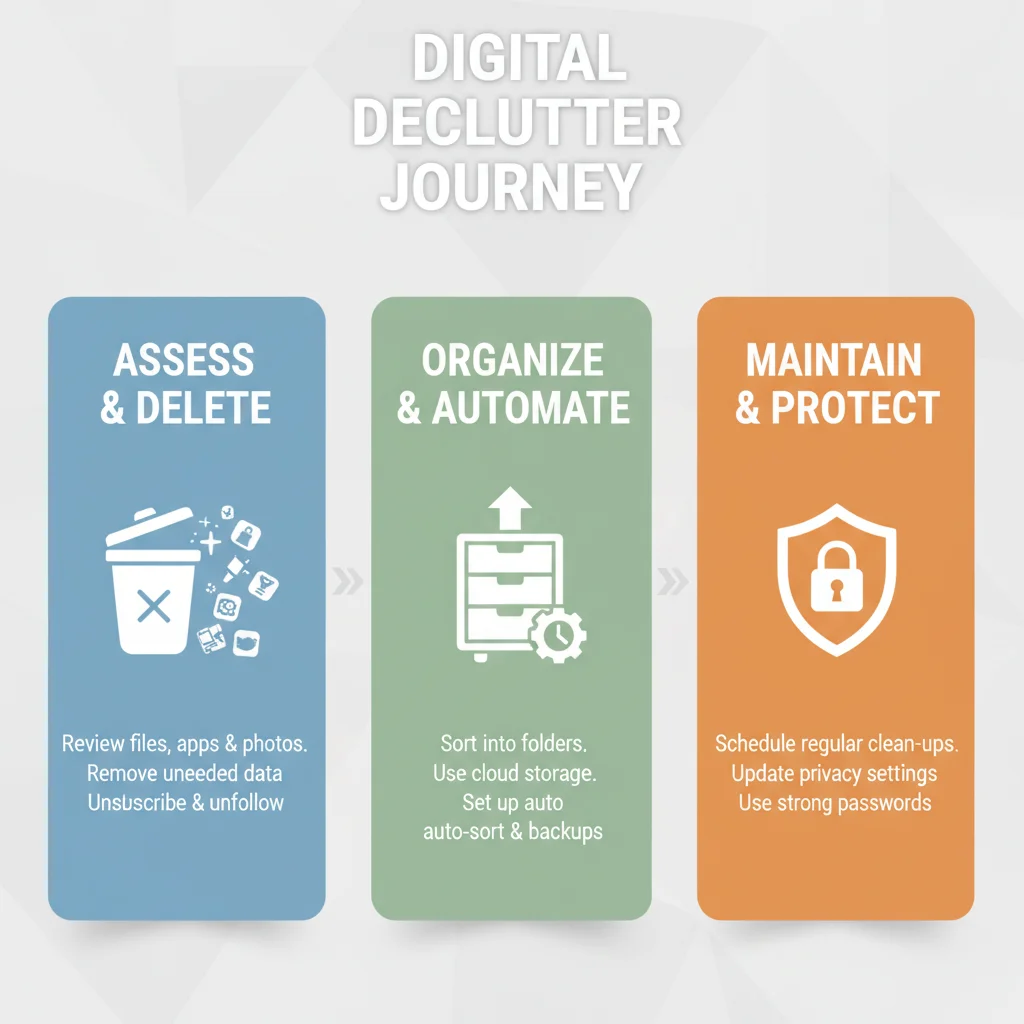
The journey to a fully organized digital life in 2026 might seem daunting at first, but by breaking it down into these three manageable steps – Assess & Delete, Organize & Automate, and Maintain & Protect – you can achieve lasting results. Remember, it’s not about perfection, but about progress and intentionality. Each file deleted, each app uninstalled, and each notification silenced contributes to a more peaceful and productive digital existence.
As technology continues to evolve at a rapid pace, so too must our strategies for managing it. Making digital declutter 2026 a priority is an investment in your well-being and efficiency. By adopting these practices, you’re not just cleaning up your devices; you’re cultivating a healthier, more mindful relationship with the digital world that permeates so much of our lives. So, take a deep breath, roll up your digital sleeves, and embark on this transformative journey. Your future self, with a clear mind and an organized digital space, will thank you.
Start today, even if it’s just for 15 minutes. The cumulative effect of small, consistent actions will pave the way for a digitally serene 2026 and beyond.